3D products and augmented reality
Your product in 3D, on screen and on the customer’s table
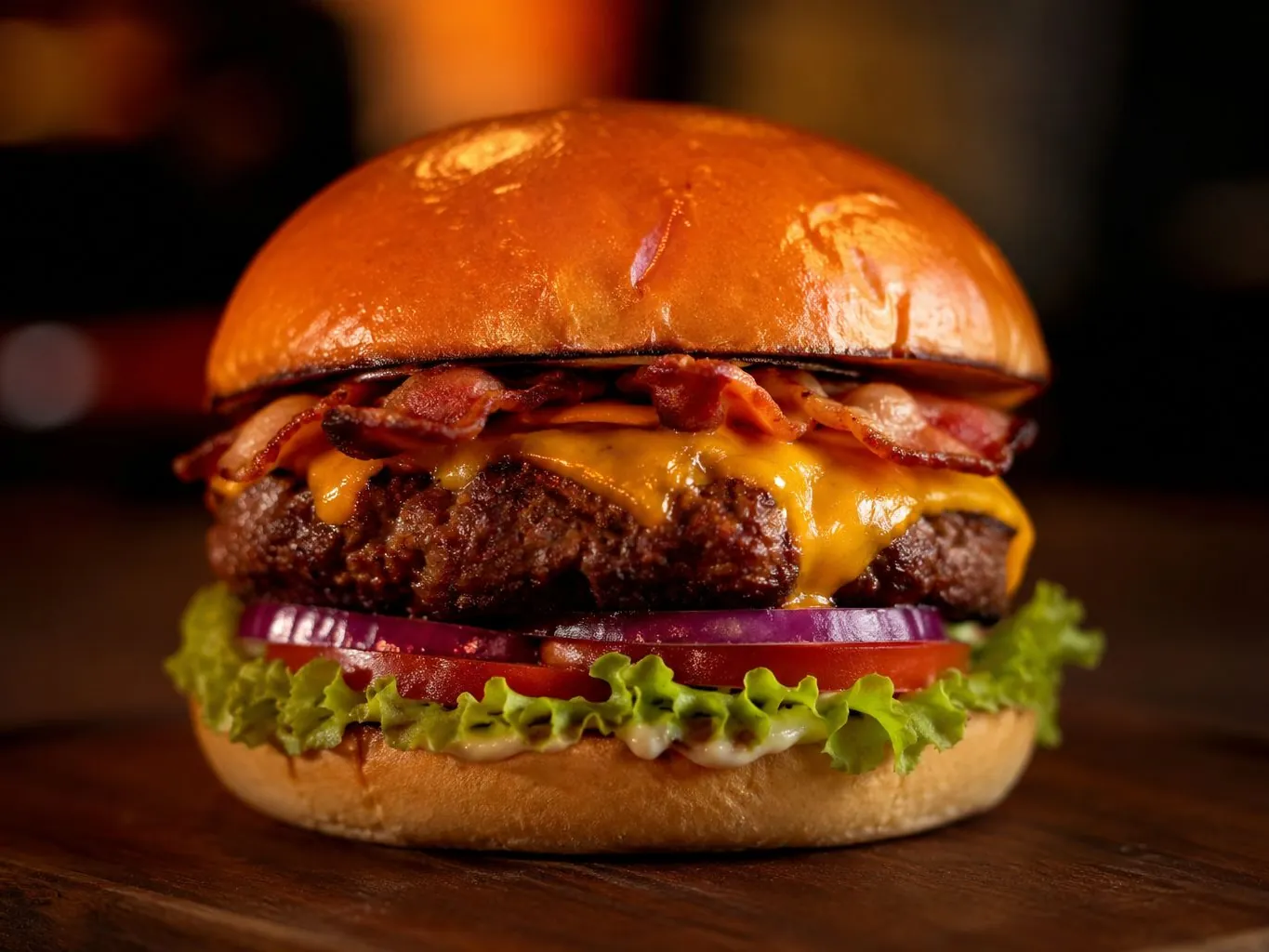
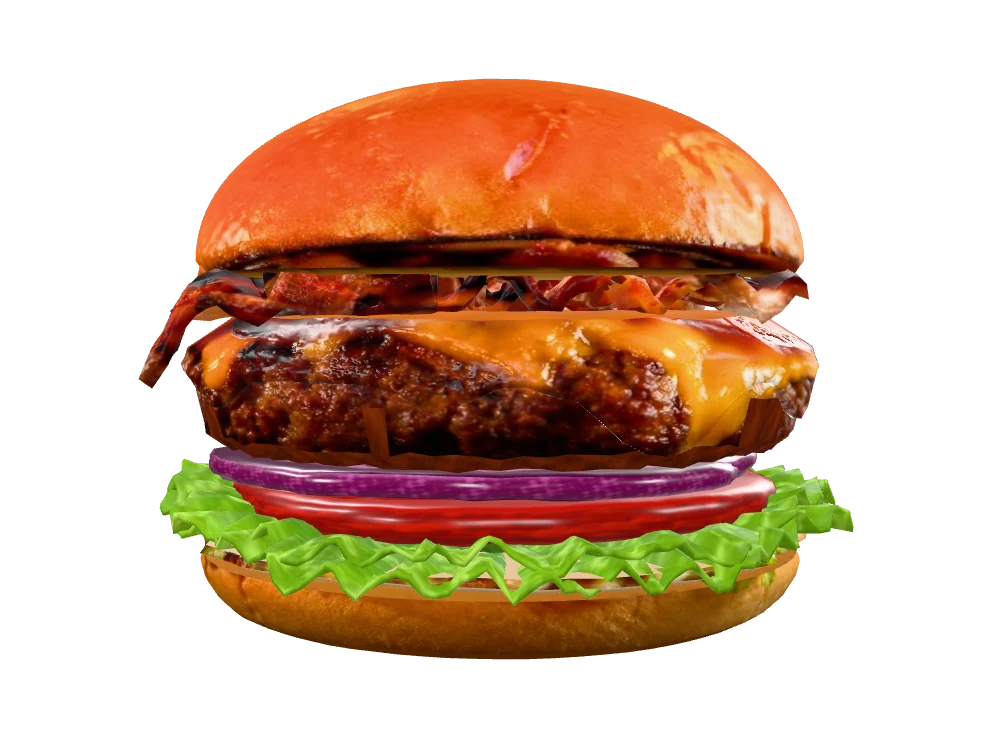
PromtuFood IA turns a product photo into a 3D model. On the menu, customers rotate and zoom the model and, on compatible phones, place the product on their own table through the camera.
It depends on the PromtuFood IA services connected for your store and on wallet balance. It has not been tested on physical phones yet.
Loading the 3D model…
Drag the handle to compare. On the 3D side, rotate the product.
Demonstration example. On your menu, customers see the photo of your product and the model generated from it.
In the dashboard
Seven steps, with your approval before publishing
The restaurant does not need to know anything about modeling. You send a photo and PromtuFood IA does the work in steps, but nothing reaches the menu without your approval, and every step shows what will be charged before it happens.
Step 1 of 7
Photo
You pick the product and use the photo it already has or upload another one (JPEG, PNG or WebP, up to 12 MB). The photo becomes a reference copy, kept in a private area. The photo shown on the menu does not change.
- What you do
- Pick the product and the photo. A whole product, uncropped, with good light and a clean background gives a better result.
- And the cost
- This step charges nothing.
Step 2 of 7
Views
PromtuFood IA prepares four views of the product, front, left, right and back, using the same photo as a reference. The parts that do not appear in the image are estimated, so some details may vary.
- What you do
- Ask for the views. The screen warns that the hidden sides are estimated.
- And the cost
- Each view is charged separately, and the price shows before you confirm.
Step 3 of 7
Approval
Each view can be approved, rejected (with a reason) or redone. Redoing creates a new version, and you can compare versions and swap the approved one. Only approved views go on to the model.
- What you do
- Approve, reject or redo each view. Some are required and others optional, depending on the level you choose.
- And the cost
- Redoing a view is charged again. Approving and rejecting are free.
Step 4 of 7
Quality
You choose the model level. The cost panel shows how much has already been paid for that product, what will be reused from the approved views, how much will be charged now and the balance available. Changing level later does not charge the views again.
- What you do
- Choose the level. A level that PromtuFood has not yet released for your store shows as unavailable.
- And the cost
- The price of each level is set by PromtuFood and shown on screen. Without enough balance, the screen takes you to the wallet.
Step 5 of 7
Generation
PromtuFood IA generates the 3D model from the approved views. It takes a few minutes and you can leave the screen, because progress continues. After the maximum time (20 minutes by default), the request is canceled.
- What you do
- Wait, or come back later.
- And the cost
- A technical failure with no result is not charged. A model that was generated is charged, even if you reject it later.
Step 6 of 7
Review
You rotate and zoom the model, test augmented reality on your own phone and decide. You can approve, reject with a reason, ask for another model at the same level or choose another level.
- What you do
- Approve or reject. A rejected model stays in the history and is never published.
- And the cost
- Rejecting does not refund the amount. Asking for another one is charged again.
Step 7 of 7
Publishing
Only an approved model can be published. You can enter the real dimensions in centimeters (optional) and choose how the product appears. The first published model changes the product to a photo with access to 3D. You can remove the 3D from the menu whenever you like, and the product goes back to showing only the photo.
- What you do
- Publish, enter width, height and depth if you want, and choose the display mode.
- And the cost
- Publishing is free.
In the dashboard (interface in Portuguese): PromtuFood IA › Modelos 3D or Catálogo › Produtos › editar o produto › Modelo 3D
On the menu
Each product chooses how it appears
After publishing, you set the display mode product by product. The first published model already switches the product to a photo with access to 3D.
Dimensions in centimeters (optional)
At the publishing step you can enter width, height and depth, in centimeters, up to 99,999 with one decimal place. The viewer uses the largest measure to size the model, and the customer can switch between the size set by the store and a free fit.
The size in augmented reality stays approximate. Depending on the path the device uses, the scale set by the store may not be applied.
For the customer
A button on the card and a window to rotate
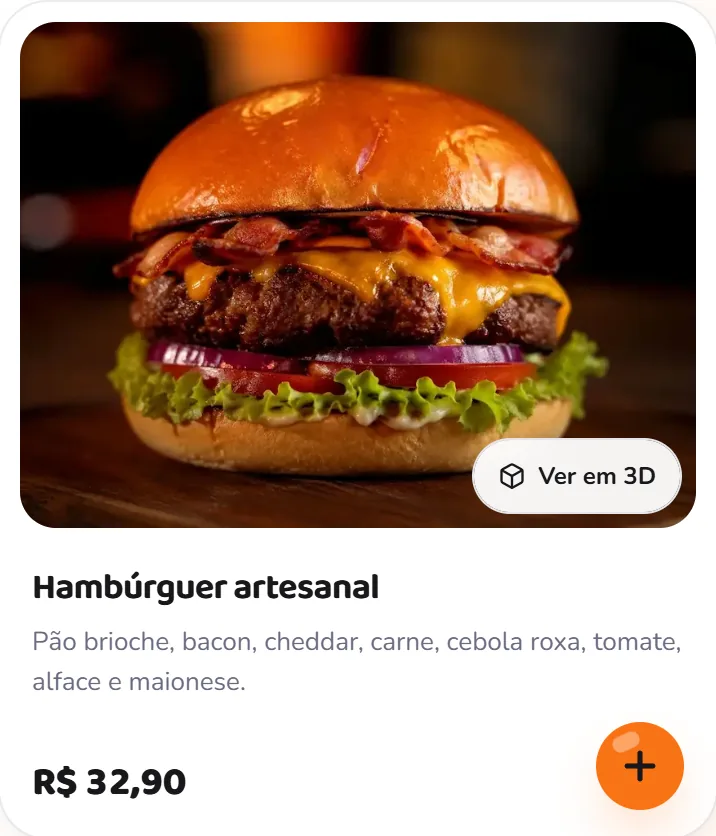
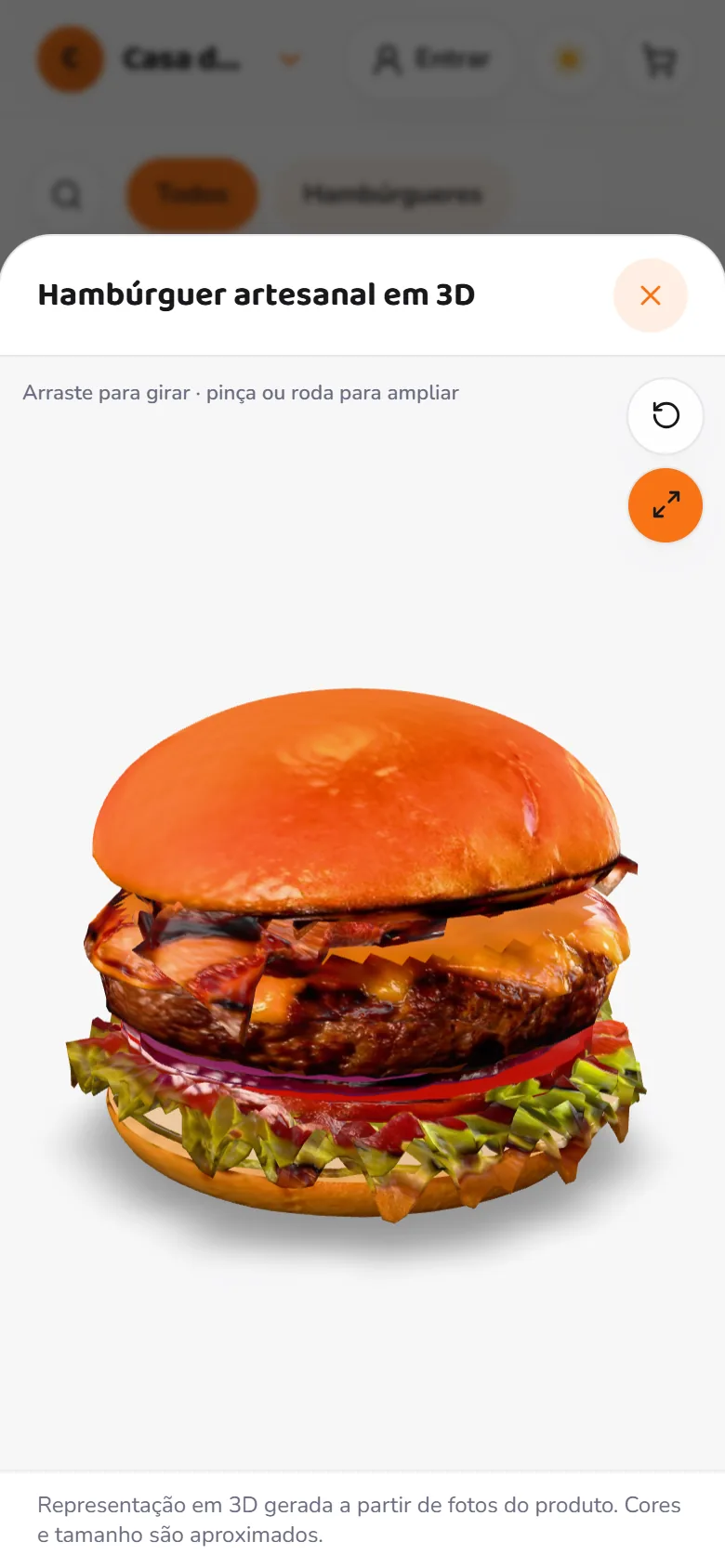
When a product has a published model, the card shows the “Ver em 3D” (View in 3D) button. It opens a window with the model: the customer drags to rotate, pinches or uses the mouse wheel to zoom and returns to the starting position with one tap.
- The 3D component is only downloaded when someone opens a model, so the menu opens light.
- People who asked their device for less motion do not see the automatic spin.
- If the 3D fails, the window says so and the photo remains the alternative.
- The footer of the window says the 3D is generated from product photos and that colors and size are approximate.
Augmented reality
What to expect from each device
The “Ver no meu espaço” (View in your space) button only appears when the device reports that it can open augmented reality. The customer taps it, the browser or the system asks for camera permission and the product appears on the table or the floor. On Android with Chrome, the experience opens inside the browser. If it fails, or in other browsers, the Google app takes over. On iPhone, the screen is the system’s own.
| Device and browser | What works | Notes | Source of the information |
|---|---|---|---|
| Android with ARCore and a current Chrome | 3D and augmented reality, inside Chrome or through the Google app. | Requires HTTPS. Chrome asks, once per site, for permission to use the camera and map the surroundings, and may offer to install Google Play Services for AR. | Official documentation |
| Android with Samsung Internet | 3D and, in part, augmented reality. | There have been versions in which augmented reality stopped working. There is no recent official note. | Third-party reports |
| Android with Edge, Opera, Brave and other Chromium-based browsers | 3D and, probably, augmented reality. | No official source confirms it browser by browser. | Not confirmed |
| Android with Firefox | 3D only. | The augmented reality button does not appear. | Documentation and code |
| Android without ARCore, or outside Google’s device list | 3D only. | The official device list is a certification list. A listed device can still fail if Google Play Services for AR is out of date. | Official documentation |
| iPhone or iPad with Safari (iOS 12 or newer, A9 chip or newer) | 3D and augmented reality through AR Quick Look, the system’s own viewing screen. | The iPhone does not use WebXR. If the model does not come with a USDZ file, the device generates one on the spot, without animations. | Official documentation |
| iPhone with Chrome, Edge or Firefox | 3D and, according to the component’s notes, augmented reality. | Recognition of these browsers on iPhone is unstable. Older reports mention failures. | Third-party reports |
| In-app browser of Instagram, Facebook or WhatsApp | 3D, if the browser can draw 3D graphics. | Augmented reality usually does not open, and the button may appear and do nothing. Opening the link in Chrome or Safari fixes it. | Third-party reports |
| Computer (Windows, macOS or Linux) | 3D only. | There is no augmented reality on a computer. The button shows a QR Code to open the demonstration on a phone. | Official documentation |
Research from 18 November 2026 in documentation from Google, Apple and the viewer component. No test on a physical device has been done yet.
Camera, permissions and files
The camera is only used after the tap on the augmented reality button. The PromtuFood site does not ask for camera access: the permission window belongs to the browser or the system, and in Chrome the choice is saved per site.
The model is a GLB file, limited to 60 MB. The USDZ file for iPhone only exists if the generation service delivers it. Without it, the device itself converts the GLB when opening augmented reality. For the Google app and for iPhone, the recommendation is models under 100 thousand triangles and textures up to 2048 pixels.
Try it
Open it on your phone and see it on your table
Point your phone camera at the QR Code. It opens the demonstration directly, without creating an account, with the sample burger and the augmented reality button when your device supports it. The camera is only used after you tap the button.
If your phone does not offer augmented reality, the page explains it and you can still rotate the model.
Also in PromtuFood IA
Improve photos: the same balance, another use
Before generating the 3D, it is worth taking care of the photo. The Improve photos tool standardizes the menu images with the same background and framing, or improves light and sharpness, and you review each image before publishing.
Standardizing
Applies the background chosen from the gallery and a standard framing, without touching the product.
Standardizing with enhancement
Includes the standardizing and also improves light, sharpness and presentation, without changing ingredients, portions or packaging.
- You choose one or several products and a background from the gallery, and the tool shows the total before it starts. The Standardize all option works in a batch.
- Each image can be approved, rejected (with a reason) or redone. The original photo is never deleted, and publishing can be undone.
- Usage is charged to the wallet, with the amount shown beforehand. Rejecting a result does not refund the amount.
In the dashboard (interface in Portuguese): PromtuFood IA › Melhorar fotos or Catálogo › Produtos › Melhorar foto
Questions about this feature
Can I upload a 3D model I already have?
No. Today the restaurant sends only the reference photo, and the model is generated by PromtuFood IA in steps. There is no upload of GLB or USDZ files through the dashboard.
How much does it cost to generate a model?
Usage comes out of the PromtuFood IA wallet balance, which is topped up by Pix. Each view and each model has a price set by PromtuFood, and the screen shows the price before you confirm. 3D is not included in the monthly fee, and this site does not list prices because they change in the platform’s dashboard.
Will the model look exactly like my product?
It will look similar, and the difference shows mainly on the sides the photo does not show, which PromtuFood IA estimates. Colors and size are approximate, and the menu itself tells the customer so. That is why you review view by view and model by model before publishing. We have not yet measured the quality of the result with the real generation services.
Does augmented reality work on any phone?
No. It depends on the device, the browser and the system. The table on this page shows what the official documentation confirms and what is still unconfirmed. Without support, the customer still sees the model in 3D.
Does the customer need to install an app?
Nothing from PromtuFood is installed. On some Android phones, the system may offer to install Google Play Services for AR the first time, and that belongs to Google.
Is the camera used without my knowing?
No. The camera only comes in after the person taps the augmented reality button, and the one asking for permission is the browser or the system. The PromtuFood site does not ask for camera access.
What if the 3D does not load?
The menu shows the failure message and the product photo stays available. In 3D-only mode, the product detail goes back to showing the photo.
Was the demonstration on this page generated by PromtuFood?
No. It is a demonstration example, so you can try the viewer and augmented reality.
About the demonstration
The burger on this page, in the photo and in 3D, is a demonstration example.
To check the details
Feature sheet for this page
Requirements, limits and the path in the dashboard for each feature. Open the ones you need.
3D products and augmented realityNeeds setup
PromtuFood IA turns a product photo into a 3D model that customers rotate on the menu and, on compatible phones, place on their table through the camera.
Depends on an outside service, account or equipment.
What it does
- The restaurant sends one photo. PromtuFood IA prepares four views (front, left, right and back), the store approves each one and the model is then generated in three quality levels.
- Customers tap “View in 3D”, rotate and zoom the model, and see it in their own space on compatible phones.
- Each product chooses how it appears: photo only, photo with a 3D button, or 3D only on the detail screen.
- Dimensions in centimeters (optional) help with scale. The size in augmented reality is approximate.
What must be ready first
- 3D services connected by PromtuFood for the store, and a balance in the PromtuFood IA wallet.
- A profile with permission for the creation tools (administrators and managers have it).
- For augmented reality: a compatible phone, a current browser and a page served over HTTPS.
Limits
- The restaurant sends only the photo. Ready-made 3D files cannot be uploaded.
- The sides the photo does not show are estimated by PromtuFood IA, and colors and size are approximate.
- Every view and every model is charged by usage. Rejecting a result does not refund it.
- It has not yet been validated with the real image and 3D services or on physical phones.
In the dashboard (interface in Portuguese): PromtuFood IA › Modelos 3D or Catálogo › Produtos › editar produto › Modelo 3D
Related: Improve photos with PromtuFood IA, PromtuFood IA wallet, Products, options, combos and promotions
Improve photos with PromtuFood IANeeds setup
Standardizes the menu photos with the same background and framing, or improves light and sharpness, and the restaurant reviews each image.
Depends on an outside service, account or equipment.
What it does
- Choose one or several products and a background from the gallery. Two modes: standardizing, and standardizing with enhancement.
- “Standardize all” in a batch, with the total confirmed before it starts.
- Approve, reject or redo each image. The original photo is never deleted and publishing can be undone.
What must be ready first
- The photo service connected by PromtuFood, at least one active background and a wallet balance.
Limits
- Rejecting does not refund the amount. There is no manual editing.
- It has not yet been validated with the real image service.
In the dashboard (interface in Portuguese): PromtuFood IA › Melhorar fotos
Related: 3D products and augmented reality, PromtuFood IA wallet
See also
- Automatic customer serviceA virtual attendant from PromtuFood IA on WhatsApp and in the menu chat that checks the real menu, builds the cart, reports the order status and hands the conversation to the team.
- Digital menuOnline menu with its own link, the store’s visual identity, options and add-ons, promotions, cart and live opening status.
- Conversation centerA single inbox for WhatsApp and the menu chat with statuses, assignment, search, internal notes, quick replies and a copilot that summarizes and suggests answers without sending anything to the customer.