On-site orders
The customer orders from the table, the dining room serves
Each store gets an address just for people inside the restaurant and a QR Code to open it. The order lands in a menu of its own, with no address or fee, and the dining room team sees only what it needs.
It comes turned off. You turn it on in Configurações.
Peça pelo celular
Aponte a câmera para o QR Code
Sua loja
Pedido no local
Sem endereço e sem taxa de entrega.
Enviar pedidoThe phone screen shows the customer form as it really is, in Portuguese.
The QR Code and the address are the same whether the channel is on or off. On this sheet, the QR leads to this page. On your store, it leads to the on-site ordering address, which appears in Configurações.
The address
One QR Code per store, and it never changes
The address has the format /local/ followed by an 8-character code, generated once and for good. Pausing the channel and turning it on again does not change the code, so the printed sheet keeps working.
It is one QR Code for the whole store, not one per table. The customer enters the table or tab on the form. To have the QR on every table, print the same sheet as many times as you need.
- Generated in the dashboard itself, with no outside service, to download as PNG or SVG or print on an A5 sheet.
- Typing the address or opening a link goes to the same place and gives the same result. The QR Code is just one way to get there.
- If the store turns on its own domain, the QR printed with the old address keeps opening, because the subdomain redirects.
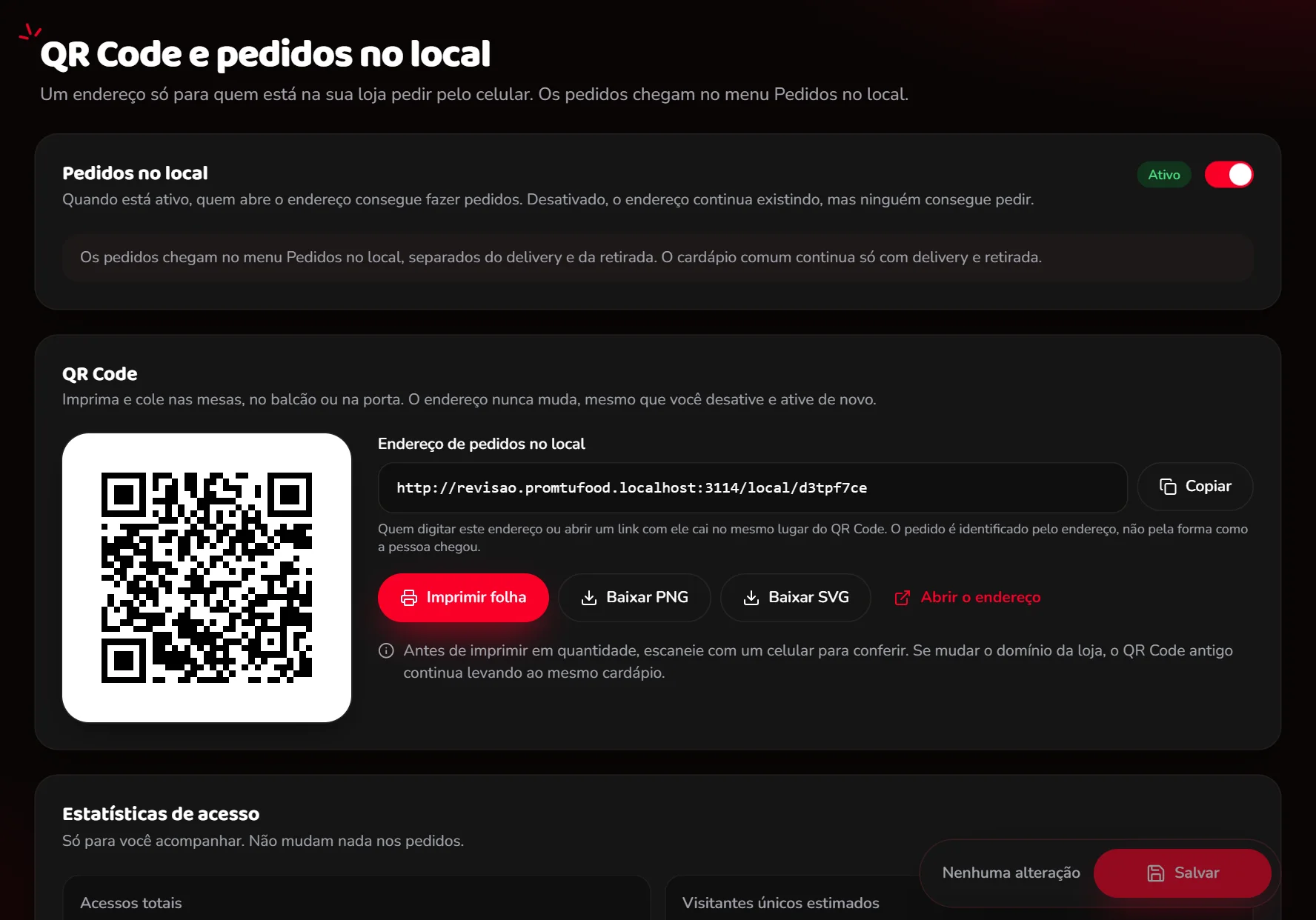
In the dashboard (interface in Portuguese): Configurações › QR Code e pedidos no local
From the phone to the board
The server decides what counts as an on-site order
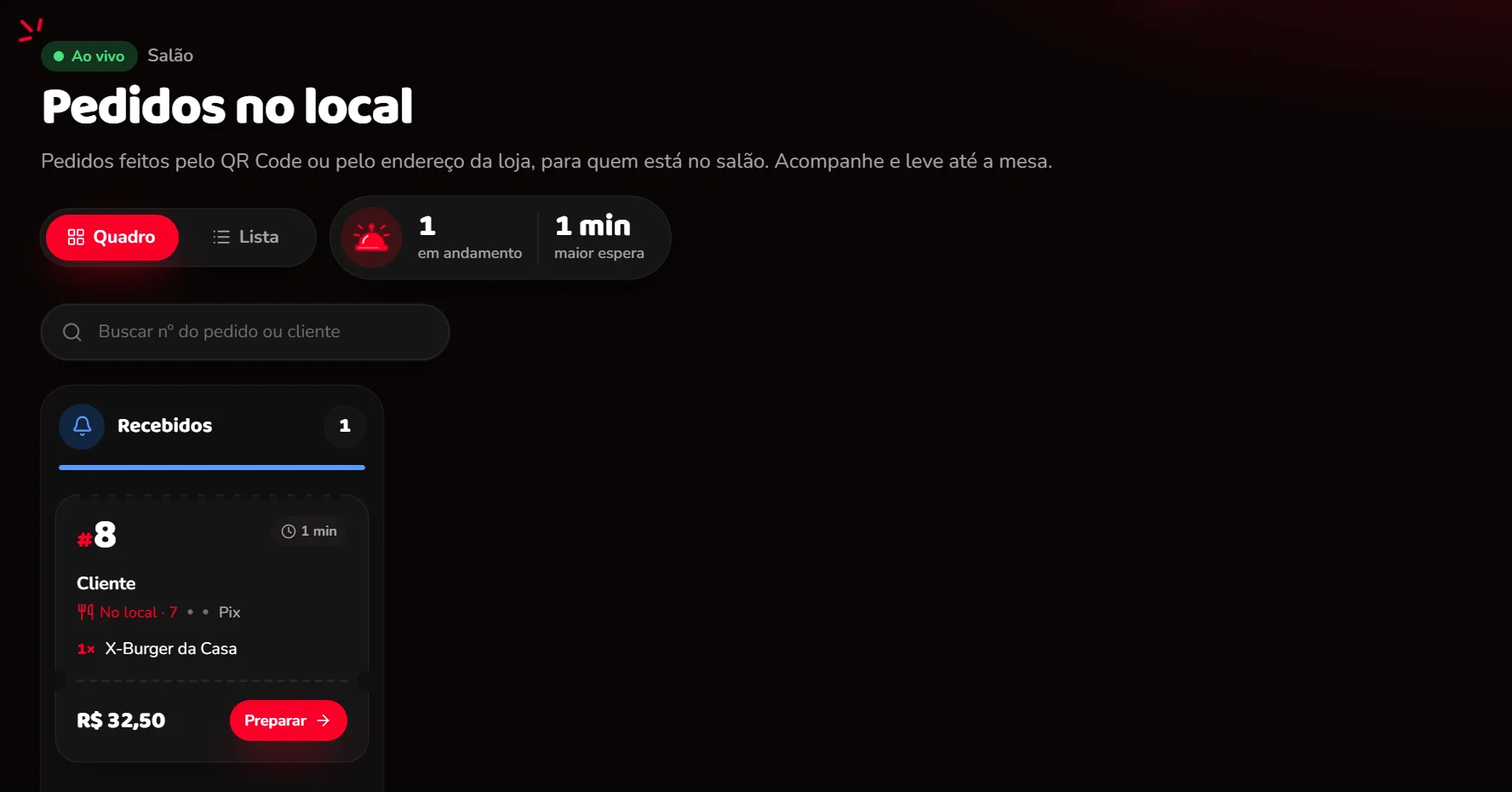
Every order placed through this address is classified as an on-site order, and the server is what checks it, not the browser. No URL parameter, cookie or form field changes that. The regular menu stays with delivery and pickup only.
- A separate menu: On-site orders uses the same board as the order center, with alert, real time and printing. These orders do not show up in Orders or in Delivery.
- Dining room steps: received, in preparation, ready and served. There is no “on the way”.
- A different ticket: the print shows Pedido no local (on-site order) and the table or tab, with no address.
- Hours do not block: someone in the dining room is served even after the registered hours. Only the store’s manual pause holds orders.
How many people opened it
Statistics that do not track anyone
The dashboard shows total visits and estimated unique visitors, for the last 30 days and since the start. It is information so you know whether the QR is being read, and it does not affect anything in the order.
How the unique visitor is estimated
For each visit, the platform calculates a number from the IP and the browser with a secret that changes every day, uses that number to update a small set of registers (an approximate counting technique) and discards everything. Because the secret changes, yesterday’s number does not connect to today’s, and there is no way to know whether a specific person visited. Bots and link previewers, like WhatsApp’s, do not count.
Dining room team
The waiter goes straight to the dining room orders
Waiter is a team role, created from the same invitation screen as the others. Their home screen is On-site orders and that is the only menu they have. The check happens on the server and also in the database, and the step changes they make are kept in the audit log.
| Action | Waiter | Attendant |
|---|---|---|
| See and handle on-site orders | ||
| Move the order through the steps, up to served | ||
| See delivery and pickup orders | ||
| Delivery panel and manual orders | ||
| Cancel an order | Not allowed | |
| Customers, reports and settings | Customers yes, the rest no |
The waiter does not see the cancel button, and the server and the database refuse a cancellation even from a direct request. Individual permission adjustments never give extra access to this role.
In the dashboard (interface in Portuguese): Configurações › Equipe e permissões (convite com o papel Garçom) or Vendas › Pedidos no local
Turning on and off
Turning it off really works, and deletes nothing
- 1
You turn the channel off in Configurações. An order that was already being finished completes first and is valid.
- 2
After that the server refuses any new order, including from someone who had checkout open.
- 3
Customers see a page with the store’s logo, name and colors that explains in one sentence and leads to the menu. This happens within 30 seconds, or right away if they try to finish.
- 4
Address, QR Code, statistics and past orders are kept. Turning it back on accepts orders again through the same QR.
Questions about this feature
Does the customer have to download an app?
Can I know which table each order came from?
Does the on-site order go into reports?
How does the customer pay?
To check the details
Feature sheet for this page
Requirements, limits and the path in the dashboard for each feature. Open the ones you need.
On-site orders with QR CodeReady to use
A dedicated address and one QR Code per store so customers order from the table, with a menu of its own for the dining room team.
Works with the restaurant’s own setup.
What it does
- A fixed address with a code generated once, a QR Code to download (PNG or SVG) and a sheet to print.
- The customer enters a table or tab number (configurable: none, optional or required). No address and no delivery fee.
- Access statistics, total and estimated unique visitors, with no cookie and no IP stored.
- Safe on and off: the QR Code and the data stay, and the customer sees a channel unavailable page.
What must be ready first
- The feature turned on in Settings (it comes off).
Limits
- It is a single QR Code per store, not one per table. To have a QR Code on each table, stick the same one.
- There is no open tab per table, bill splitting or call-a-waiter button.
- Business hours do not block this channel; only the manual pause does.
In the dashboard (interface in Portuguese): Configurações › QR Code e pedidos no local or Vendas › Pedidos no local
Related: Waiter profile, Live order center, Automatic ticket printing
Waiter profileReady to use
A team role that only sees the dining room orders and changes their stages, checked on the server and in the database.
Works with the restaurant’s own setup.
What it does
- The waiter goes straight to the On-site orders menu and does not see the rest of the dashboard.
- Moves orders through the stages, including “served”. Changes are kept in the audit log.
What must be ready first
- On-site orders turned on and a team invitation with the Waiter role.
Limits
- The cancel button does not show for the waiter, and the server and the database refuse a cancellation even from a direct request.
In the dashboard (interface in Portuguese): Configurações › Equipe e permissões
See also
- Order systemLive order center as a board or list, with a sound alert, waiting time, manual table, counter and phone orders, team and reports.
- Automatic printingA Windows program that prints the ticket on the restaurant’s thermal printer, separates sectors, reprints a copy and never repeats an order when in doubt.
- Scheduled ordersThe customer picks a day and time on the menu. The order shows in the Scheduled lane and goes to the kitchen at preparation time, with lead time, interval and limit per time slot configurable. Off until the store turns it on.