PromtuFood IA
Automatic customer service on WhatsApp for restaurants
The PromtuFood IA assistant answers your customers on WhatsApp and in the menu chat with the prices, hours and fees from your dashboard. It builds the cart, tells customers which step their order is in and calls the team when the subject needs a person.
It comes turned off. You turn it on whenever you like and pay only for use, with a prepaid balance.
In practice
One conversation, step by step
Go through the steps and see what the assistant answers and what the system does behind the scenes. The conversation is an example written for this page, with an invented store, prices and names.
Good evening! Are you open?
Good evening! We are open until 11:30 pm, for delivery and pickup. Would you like to see the menu or do you already know what you want?
It checks the store status: open, closed or paused, today’s hours, delivery and pickup. It is the same information the menu shows.
The search looks only at available products and uses the current price, promotions included. The prices in this example are made up.
The audio is transcribed (the transcription service has to be on) and the transcript shows in the Conversation center. If the customer prefers audio, the reply can also go out as voice, always with the text alongside.
On WhatsApp it generates a cart link: valid for 3 hours, good for a single order and it recalculates prices when opened. In the menu chat, the items go straight into the real cart. The customer is always the one who finishes the order.
It hands the conversation to the queue with the reason, priority and a summary, and stops answering there. The team gets the notice in the dashboard, on WhatsApp or both, and someone takes over in the Conversation center.
Read the full conversation
Customer: Good evening! Are you open?
Assistant: Good evening! We are open until 11:30 pm, for delivery and pickup. Would you like to see the menu or do you already know what you want?
Customer: Do you have calabresa pizza? How much is it?
Assistant: We do. The Calabresa pizza is R$ 49.90. Shall I build the cart for you?
Customer: (audio, 0:06) I want two calabresas.
Assistant: Noted: 2 Calabresa pizzas. I will build the cart now.
Assistant: I built the cart with 2 Calabresa pizzas. Open the link to check it and finish. It is valid for 3 hours.
Customer: Do you offer a birthday discount?
Assistant: That is up to the store’s team. I have passed your question on to them, and someone will answer here.
What it does
It answers with what is in your dashboard, not with guesses
Looks up the menu
Available products, current prices, options and add-ons. In the menu chat, it shows up to six products with photos.
Knows whether the store is open
Uses the same status as the menu: open, paused or closed, hours, fees, minimum order and payment methods.
Builds the cart
In the menu chat, it puts the items in the cart. On WhatsApp, it sends a cart link valid for 3 hours. The customer is the one who finishes.
Says where the order is
Only the customer’s own orders. On WhatsApp, it recognizes the customer by the number writing in, and if the number does not match the one on the order the conversation goes to the team. In the menu chat, it only reports orders from the same session.
Understands audio and images
It transcribes voice messages (the transcription service has to be on) and looks at the two most recent images. It answers in the customer’s language. An audio reply is optional and only goes out to someone who sent audio or prefers audio, always with the text alongside.
Uses what you approved
It answers with the replies you approved and notes the questions it could not answer, for you to complete later. See more below, under Knowledge.
In the dashboard (interface in Portuguese): PromtuFood IA › Atendimento automático
What it does not do
Clear limits, and the difference between a rule and an instruction
- It does not finish an order for the customer and does not change their record: it has no tool for that.
- It does not authorize refunds, exchanges, discounts or exceptions. By the instructions it was given, those topics go to the team.
- It does not read the content of a PDF. When the customer sends a document, it sees only the file name.
- It has no opening hours of its own: it answers 24 hours a day while it is on.
What is an instruction and what is a system block
The assistant simply has no tool to finish an order or to change the customer record. Other rules are instructions given to PromtuFood IA: do not authorize refunds or discounts, do not make up delivery times, do not promise preparation while the store is closed, only mention promotions and coupons when the customer asks, and introduce itself as a virtual assistant when asked. Instructions reduce these mistakes, but they have not yet been checked with the real provider of the automatic customer service, so it is worth reviewing the first conversations.
When a person is needed
The assistant hands the conversation to the team queue with the reason, priority and a summary, and stops answering there. The team gets the notice in the dashboard, on WhatsApp or both. In the Conversation center, someone takes over, answers, leaves internal notes and, if they want, hands the conversation back to PromtuFood IA.
You are in control
Turn on only what makes sense for your store
Automatic customer service comes turned off and is turned on per channel (WhatsApp and the menu chat). You give the assistant a name and decide whether it can build carts, look up orders, recommend products, talk about coupons, listen to audio, answer with voice and pick a conversation back up after some time in silence.
It keeps for 90 days what is useful to remember about each customer, like a preference they mentioned, and refuses sensitive data. You see and delete these memories and can mark numbers it must not memorize. There is also a field for store guidelines, up to 2,000 characters, that it follows without overriding the safety rules.
Knowledge
What it could not answer becomes a task for you
The assistant does not learn on its own. When it does not know an answer, the question goes to a list, and only what you review and approve takes effect.
- It does not knowThe customer’s question is saved as an open question.
- Similar questions are groupedSimilar questions appear together, so you answer once.
- You write and approveThe reply you reviewed, up to 2,000 characters, can be edited and turned off later.
- It starts using itPrice, stock, hours, delivery and payment keep coming from the store records, never from an approved reply.
The same screen shows what the assistant kept about each customer, with the option to delete one item, delete everything or mark the customer to be ignored by memory. Nothing passes from one store to another.
In the dashboard (interface in Portuguese): PromtuFood IA › Conhecimento
Help inside the dashboard
A help that takes you to the screen and shows the button
In the corner of the dashboard there is a floating help, which you can drag or minimize. It knows about 235 places in the dashboard. When you ask “where is stock?”, it opens the screen and highlights the element with Mostrar onde fica (show where it is), only for the options your profile allows.
In the step-by-step tutorials, a step only advances when the screen shows it was done. It also answers questions about the store’s numbers, like best sellers, sales and current orders. It only reads and navigates: it never changes anything.
Without balance, with the service turned off or above 30 questions per hour per person, the answer comes from the screen map, at no cost.
11 tutorials
- Register a product
- Change the store hours
- Create a coupon
- Set up the delivery fee
- Add someone to the team
- Change the colors and the logo
- Choose the payment methods
- Follow and advance an order
- Adjust stock
- Top up the wallet
- Standardize photos
Two ways to connect the store’s number
QR Code
You scan the code with the store’s phone, as in WhatsApp Web. It is an unofficial connection: there is a risk that WhatsApp restricts or blocks the number.
Official Meta API
You enter the Meta account details. Meta may charge fees per message directly to the store, and free-form messages only go out to people who wrote to the store in the last 24 hours.
Notices for each step, even without automatic customer service
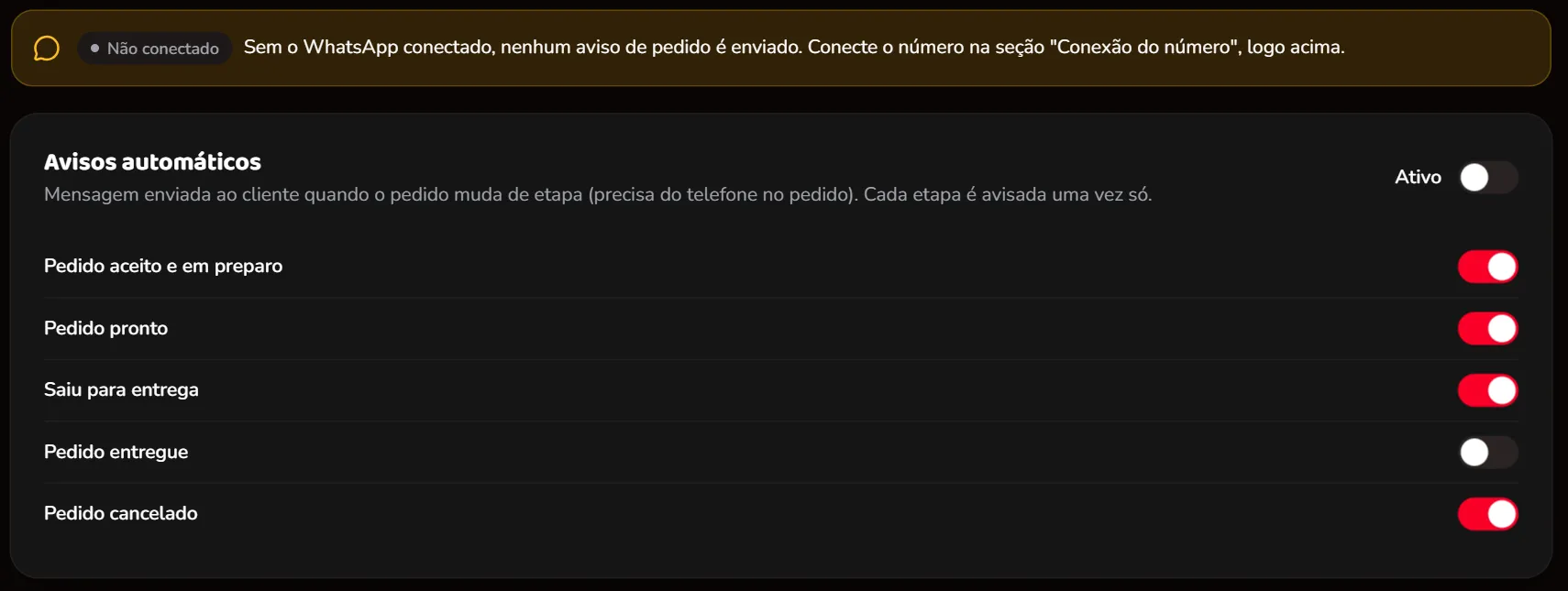
With the number connected, the customer gets a message when the order goes into preparation, is ready, goes out for delivery, is delivered or is canceled. You turn on only the steps you want (the delivered notice comes turned off), and each one notifies once per order. The notices are not charged to the wallet.
The text of the notices is fixed, and if sending fails it does not try again. On the Meta API, the notice only goes out if the customer wrote to the store in the last 24 hours, which almost never happens with someone who orders only through the menu.
With automatic customer service turned off, messages received on WhatsApp keep arriving in the Conversation center, and the team answers there, with quick replies and audio. The menu chat, on the other hand, only exists with automatic customer service on.
In the dashboard (interface in Portuguese): Configurações › WhatsApp
What it costs
You pay for what you use, with a prepaid balance
PromtuFood IA has no monthly fee of its own. You top up the wallet by Pix and each use deducts the value of the service, each in its own billing unit: for example, transcription is billed per second of audio and voice per thousand characters. The same wallet pays for the other tools: improving product photos, 3D models, the Conversation center copilot and the help inside the dashboard.
Price before use, refunds and what stays out
The price shows before you confirm only for photos and 3D models. For customer service, transcription, voice, the copilot and help, the value of each use appears in the statement, after it is charged. If the store is closed for good, the unused balance is refunded (courtesy credit is not refunded). The monthly fee and the own domain do not go through the wallet. Meta’s fees, when there are any, are charged to the store by Meta itself.
In the dashboard (interface in Portuguese): PromtuFood IA › Carteira e consumo
Questions about this feature
Do customers know they are talking to a virtual assistant?
Can PromtuFood IA close the order on its own?
Do I need automatic customer service to send order notices on WhatsApp?
What if the balance runs out?
Does it answer in the middle of the night?
Does it read the PDF a customer sends?
To check the details
Feature sheet for this page
Requirements, limits and the path in the dashboard for each feature. Open the ones you need.
Order notices on WhatsAppNeeds setup
The customer gets a message when the order enters preparation, is ready, leaves for delivery or is canceled.
Depends on an outside service, account or equipment.
What it does
- A master switch and one per stage. It works without PromtuFood IA and does not charge the wallet.
- Texts of their own for on-site orders.
- An optional notice about the refund of an online payment on a canceled order, off until the store turns it on, with a choice of moments.
What must be ready first
- The store’s WhatsApp connected.
Limits
- With no number connected, nothing is sent. There is no SMS or email for orders.
- The refund notice only talks about a confirmed refund after the provider confirms it or the store records it, and never promises a deadline.
- On Meta’s official API, the notice only goes out if the customer wrote to the store in the last 24 hours.
- The QR Code connection is not official and WhatsApp may restrict the number.
In the dashboard (interface in Portuguese): Configurações › WhatsApp › Avisos automáticos
Related: Automatic customer service on WhatsApp and chat, Conversation center and copilot
Automatic customer service on WhatsApp and chatNeeds setup
A virtual assistant that answers customers, checks the real menu, builds the cart and calls the team when it needs to.
Depends on an outside service, account or equipment.
What it does
- Checks products, hours, fees, payment methods, coupons and the customer’s own orders.
- On WhatsApp, it sends a cart link valid for 3 hours. In the menu chat, it builds the real cart.
- Hands the conversation to the team with a reason and priority. It understands audio and images and replies in the customer’s language.
What must be ready first
- A customer service tool connected by PromtuFood for the store, and a wallet balance. The assistant starts off until the restaurant turns it on.
- WhatsApp connected and/or the menu chat turned on. For audio, the transcription service.
Limits
- It does not finalize orders, change records or authorize refunds. Rules such as not inventing delivery times are instructions given to PromtuFood IA, not yet verified with the real service.
- With no balance or with the service off, the automatic customer service does not answer and the store gets a bell notice.
- It does not read the content of PDFs. It answers 24 hours a day while it is on.
- It has not yet been validated with the real providers of the automatic customer service and of WhatsApp.
In the dashboard (interface in Portuguese): PromtuFood IA › Atendimento automático or Configurações › WhatsApp
Related: Conversation center and copilot, PromtuFood IA wallet, PromtuFood IA knowledge
PromtuFood IA knowledgeNeeds setup
The restaurant sees the questions PromtuFood IA could not answer and approves answers it has reviewed.
Depends on an outside service, account or equipment.
What it does
- Unanswered questions grouped by similarity, to approve with a reviewed answer or reject.
- Approved answers, which can be edited and turned off. Customer memory with an option to delete it.
What must be ready first
- Automatic customer service turned on.
Limits
- There is no automatic learning. Price, stock, hours, delivery and payment always come from the records, and nothing passes from one store to another.
In the dashboard (interface in Portuguese): PromtuFood IA › Conhecimento
Help inside the dashboardReady to use
A floating help that takes you to the right screen, highlights the button and follows step-by-step tutorials.
Works with the restaurant’s own setup.
What it does
- A map with about 235 destinations and tutorials such as adding a product, changing hours, creating a coupon and changing colors.
- “Show me where it is” opens the screen and highlights the element, only for the options the person’s profile allows.
- Answers questions about the store’s numbers. It only reads and navigates: it never changes anything.
What must be ready first
- Being signed in to the dashboard.
Limits
- PromtuFood IA answers depend on the service being on and on the balance, and each person has a limit of 30 questions per hour. Without that, the answer comes from the screen map.
In the dashboard (interface in Portuguese): Botão de ajuda no canto do painel
PromtuFood IA walletNeeds setup
A prepaid balance that pays for using the PromtuFood IA tools, topped up by Pix and with no expiry date.
Depends on an outside service, account or equipment.
What it does
- Top up by Pix with a QR Code and copy-and-paste code, from R$ 10.00.
- Statement and usage by day, week, month and service. The store sees only the commercial name and the amount charged.
- A low balance alert and a refund of the unused balance if the store is closed.
What must be ready first
- Administrator or manager profile.
Limits
- Pix only. The monthly fee and the domain do not go through the wallet.
- Apart from photos and 3D, the amount of each use shows only in the statement, after it is charged.
In the dashboard (interface in Portuguese): PromtuFood IA › Carteira e consumo
Related: Automatic customer service on WhatsApp and chat, 3D products and augmented reality, Improve photos with PromtuFood IA
See also
- Conversation centerA single inbox for WhatsApp and the menu chat with statuses, assignment, search, internal notes, quick replies and a copilot that summarizes and suggests answers without sending anything to the customer.
- 3D products and augmented reality3D models of products made by PromtuFood IA from one photo, with a viewer on the menu and augmented reality on compatible phones. One photo only, approximate size, usage charged to the PromtuFood IA wallet.
- Delivery managementDeliveries by city and neighborhood with their own fee, estimated time and minimum order, free shipping, pickup, a deliveries board and tracking for the customer.
- Online paymentsOnline payment through the provider the restaurant connects with its own credentials (Asaas, Mercado Pago or Stripe), confirmed by an authenticated notice and a lookup, plus the pay-on-delivery options. Canceling an order paid online opens a refund request that an administrator or authorized manager approves; it goes to the provider 5 minutes later, with a chance to undo.
- Order systemLive order center as a board or list, with a sound alert, waiting time, manual table, counter and phone orders, team and reports.